How to Make Sure my Time Machine Backup is Working

Time Machine Toggle Switch

Time Machine is a great and wonderful tool, but only if it’s functioning properly. You know this, because you’ve already set up your Time Machine backup. In a twist of fate, however, you may see (as you go about your daily computer-related business) a notification that you haven’t had a backup in 22 days… Which, considering that Time Machine is supposed to create a backup every hour for the past 24 hours, is concerning. How can you tell if your backup is, in fact, working? Where can you see the latest backup? How can you make sure all of the information you want to save is there?

Not to worry: there are many tools available to check and double check your backup is running properly— and if it’s not, to reconfigure the backup service to be back on its feet.

Read more

Unable to load replica list in Yosemite Server, or Active Directory can’t be joined after upgrading

NOTE: If you have the much more common ‘Ooops, OS X Server just randomly decided to eat the most important part of my configuration’ that can result in the above error, this thread on Apple Discussion forums might prove handy. I’d write it up on the site if I figured out a surefire to fix this outside of just restoring from a OD backup you’ve hopefully made, but it makes me angry that the backups can’t be scheduled, and there is no other way to fix it, so I don’t consider myself to have a ‘fix’ just yet.

I just upgraded a client’s OS X Server from Mavericks to Yosemite 10.10 OS X server. They use Windows Server 2012 for authentication and user services through Active Directory, and the Mac server simply joins to the domain to grab authentication and user/group information.

After the upgrade, Open Directory fired on just fine, and local Open Directory users were hunky dory, but the replica list, which would typically list what AD master had been joined, simply said ‘Unable to load replica list’.

Typically, I get a little trickle of fear anytime OS X server gives me any kind of message about being unable to load anything, because that has led me down some very dark rabbit holes indeed. But this time, just as I was about try and go through the process of re-connecting the AD server (which, by the way, cannot be done with WorkGroup manager anymore) I was lucky enough to google about and stumble on this KB from apple:

http://support.apple.com/en-us/TS4600

It doesn’t pertain to it directly, but it’s close enough. To paraphrase the directions:

Read more

Kyocera Taskalfa and Google Apps SMTP

I like to keep my titles understandable by everyone, but I’ll fully admit to giving this one a few attempts before giving it all up. Sadly, there’s just not much of a way to talk about sending email from printers without involving acronyms that one would be justified for suspecting of associating with curse words during the night.

Read more

Group Members can’t access OS X Server wiki, or, users and groups can’t be added

So for a long time, there was a group set on the Out of a Jam Staff wiki. And lo, all was well. Users were added to the group, and access was had by all.

Then, one day, Michael added a new employee to the JamStaff group and and behold – they had zilch for permissions on the wiki. Being in the middle of running around like a chicken with its head cut off and its hair on fire, Michael simply added the user directly and gave them access. “I’ll fix that someday,” he told himself and, as is always the case with such things, someday never came. As time went on, it got more and more annoying, but he got more and more used to it as well, so there you go. Apathy is the immovable object.

Fast forward to today, and not only did being part of the group do zip, but it actually wasn’t possible to add a user directly to the wiki either. Oh, you could add, but saving would give a nasty red message saying ‘Error Saving ACL’s’. Wondering if the ill fated  group, which lit up in red at that message as well and was set as owner, might be part of the problem, Michael attempted to delete it. When it vanished, attempting to save just gave an unhelpful ‘Error Saving Settings’ and that’s it.

Huh.

Read more

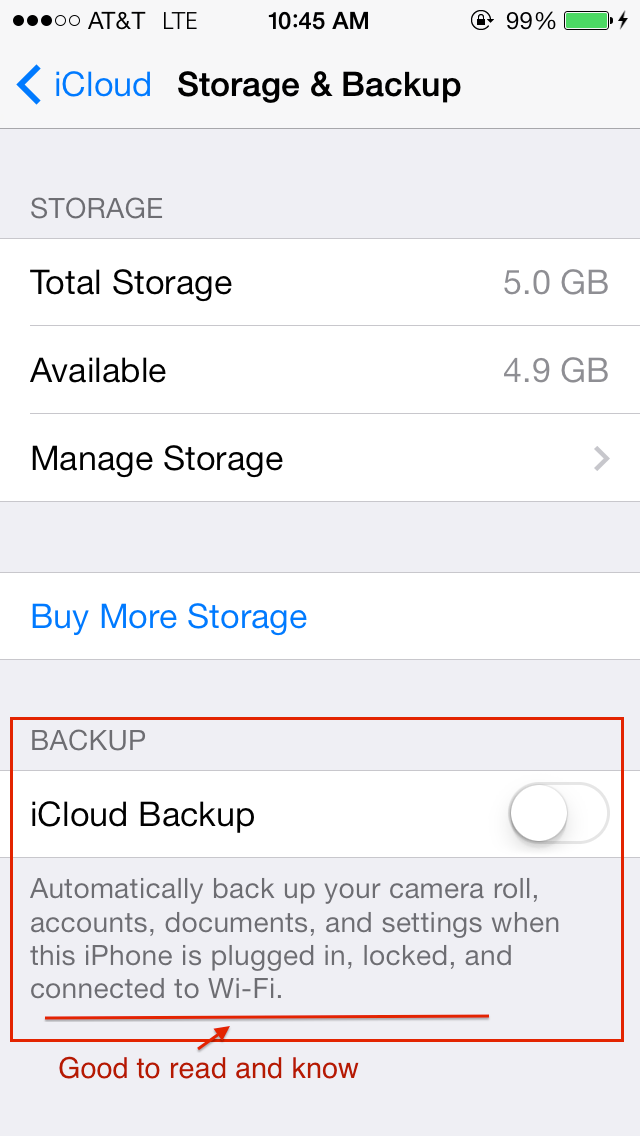
iCloud Storage Full: Or, my phone keeps annoying me and I want to smash it

iOS iPhone iCloud backup settings

The latter part of the subject could be a lot of things. The first part, too, I suppose, but fewer enough to where we can cover them here!

If you’re an iPhone user, chances are you are, whether unwittingly or not an iCloud user as well. Apple reps at the Apple Store are pretty aggressive about turning it on (Apple ad: used car salesmen everywhere: would you like to push iCloud services instead?) and iOS itself is pretty insistent you get some iCloud on.

It’s not that iCloud is bad – by and large, it’s great, and well worth having for one reason or another. The times when you wouldn’t want iCloud are worthy of an article entirely on their own, but for the moment, lets get over my absurdly long intro and get to the meat: what do you do when you start being incessantly told your iCloud storage is full?

The possible reasons are many, the common reasons are but two. 

Read more

@N twitter fraud, GoDaddy Credit Card problems or: don’t trust orders to surrender

Krak Des Chevaliers - best passwords, social engineered

The story told of twitter handle @N is pretty terrifying for anyone who walks around thinking that their internet life is safe. Strong passwords, different passwords, two factor authentication, clever security questions and more were providing them with some measure of online security. That, of course, is the assumption that the garrison of Kark des Chevaliers made right until a tricksy letter made them surrender all.

History proves again and again that time marches on, but nothing ever changes, and those who fail to study history won’t be able to whip out boring historical facts at the drop of a hat. Or learn from it, I guess.

Read more

How to Scan in Mac OS X

A little while ago, I had the following conversation over dinner:

Michael, speaking with the same enthusiasm with which he is chewing his dinner (which is a lot, considering it is delicious):

“So I’m trying to decide. Should I write about how to scan on the mac, or something different?”

Everybody at dinner:

“BoooorrriiiiZzzzzz.”

So it’s possible, I suppose, that ‘how to scan on the Mac’ isn’t the most riveting of subjects.  But I actually get that question a lot, and here’s why. 

Read more