
Group Members can’t access OS X Server wiki, or, users and groups can’t be added

So for a long time, there was a group set on the Out of a Jam Staff wiki. And lo, all was well. Users were added to the group, and access was had by all.

Then, one day, Michael added a new employee to the JamStaff group and and behold – they had zilch for permissions on the wiki. Being in the middle of running around like a chicken with its head cut off and its hair on fire, Michael simply added the user directly and gave them access. “I’ll fix that someday,” he told himself and, as is always the case with such things, someday never came. As time went on, it got more and more annoying, but he got more and more used to it as well, so there you go. Apathy is the immovable object.

Fast forward to today, and not only did being part of the group do zip, but it actually wasn’t possible to add a user directly to the wiki either. Oh, you could add, but saving would give a nasty red message saying ‘Error Saving ACL’s’. Wondering if the ill fated  group, which lit up in red at that message as well and was set as owner, might be part of the problem, Michael attempted to delete it. When it vanished, attempting to save just gave an unhelpful ‘Error Saving Settings’ and that’s it.

Huh.
Read more

iCloud Storage Full: Or, my phone keeps annoying me and I want to smash it

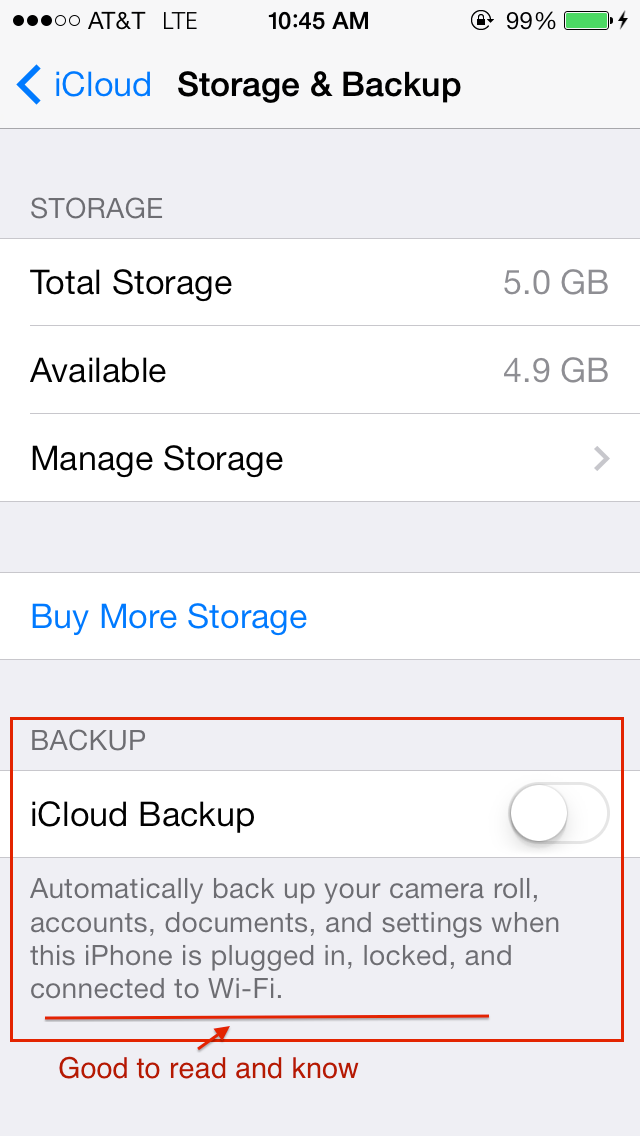
iOS iPhone iCloud backup settings

The latter part of the subject could be a lot of things. The first part, too, I suppose, but fewer enough to where we can cover them here!

If you’re an iPhone user, chances are you are, whether unwittingly or not an iCloud user as well. Apple reps at the Apple Store are pretty aggressive about turning it on (Apple ad: used car salesmen everywhere: would you like to push iCloud services instead?) and iOS itself is pretty insistent you get some iCloud on.

It’s not that iCloud is bad – by and large, it’s great, and well worth having for one reason or another. The times when you wouldn’t want iCloud are worthy of an article entirely on their own, but for the moment, lets get over my absurdly long intro and get to the meat: what do you do when you start being incessantly told your iCloud storage is full?

The possible reasons are many, the common reasons are but two. 

Read more

How to Scan in Mac OS X

A little while ago, I had the following conversation over dinner:

Michael, speaking with the same enthusiasm with which he is chewing his dinner (which is a lot, considering it is delicious):

“So I’m trying to decide. Should I write about how to scan on the mac, or something different?”

Everybody at dinner:

“BoooorrriiiiZzzzzz.”

So it’s possible, I suppose, that ‘how to scan on the Mac’ isn’t the most riveting of subjects.  But I actually get that question a lot, and here’s why. 

Read more

Could not find PPoE server, or: I’m travelling and my Mac went insane

From time to time, I get an emailf rom clients on the road about a specific problem. I’ll paraphrase:

When I left my house, my perfectly well-behaved Mac went completely mental and pops up gibbeirsh sounding messages what seems like ever two seconds. These messages are always saying the same thing, something about ‘A PPPoE server cannot be found TECH BLAH BLAH BLAH’

Read more

How to use iPhone HDR, or: advice I am not qualified to give

With apologies to Richard Murphy.

Extra special note: I am not a photographer. I do not take good photos. But I like taking photos, and as such that places me squarely in the demographic of most other iOS users out there. I wrote this after showing these examples to a number of clients who had this question – to very positive reaction, so I figured I’d save myself the time and just write it up. If the advice here gives you, a professional photographer of fame and talent,an ulcer, I sincerely apologize. Please make sure to write something angry about it and link to this blog, so that I can finally become famous via outrage, the current path to fame du jour. Thank you!

HDR, I’ve found, is a mystery to many people who have an iPhone. The most common emotion seems to be that it makes your built in camera take worse photos slower, which hardly seems like a winning proposition.

Read more

Quick tips: Having your Mac save printer settings.

Q: How do I have my printer remember my last settings?

Has this happened to you? You pull up your beautifully crafted document, go to the ‘File’ menu and choose ‘Print’. In the helpful little dialogue box that comes up, you realize that, no, you don’t want to print all 80 pages in glorious full color, and in fact, while you might not consider yourself a tree hugger per se, you wouldn’t consider yourself a tree-sucker-puncher either, so you would like to print two-sided. You click around on some menus, fiddle with some buttons and voila! The document prints the way you would like it to. Feeling well pleased with yourself, and rightfully so, you wander away from your trusty Macintosh to save the world/defeat an army/bring about world peace/go to the bathroom.

Read more

Reducing Word and PDF file size: automated. Kind of.

I HAVE A GIANT WORD/PDF DOCUMENT HELP ME WHAT DO I DO.

Panic not. First, I must congratulate you that you’ve noticed. Unless your document is so monstrous that you noticed its size because your computer started yelling at you, I’m glad you are being a conscientious citizen and not emailing 15mb files left and right, willy nilly. This is bad etiquette, poor form, not done.

On the other hand, you might want to get that file to someone, so what’s a good etiquette, fine form displaying individual to do?

Read more

My Printer Stopped Working: or, how to make me unable to pay my bills

First, a disclaimer: I hate printers. I mean, I really do. It’s a voodoo industry, full of cheap-yet-secretly-expensive devices, that seem intent only on never working exactly as they should. They are consistent in their inconsistency, and reliably rubbish. Inkjet printers have ink that costs enough to make you think they need harvest unicorn blood, and laser printers are the size of a unicorn stall. Or weird little gears and gizmos go out of whack, like some sort of fiendish goblin contraption, and it literally costs more than a computer to get the part replaced.

All that being said, there are a few, tried and true, reliable things that fix 95% of the problems people call me about when it comes to printers. Theres lots of OTHER things that go wrong, but this little procedure is what I always try first, and it generally does the trick.

Read more

New Mac Trojan variant: on not panicking and checking it out

There’s been a lot of excitement today about a Trojan targeting Macintosh computers. There is some excellent in depth coverage over at Macworld, but I wanted to hit on some highlights for people who have been asking me about this.

First, don’t panic. Even if the high end estimates are true, about 600,000 macs are infected, which amounts to about 1% of all the Mac users out there. By those percentages, I would still carry on being a great deal more worried about a great deal many more things, such as your backup plan.

That being said, unlike 99% of all the other scares out there, this one is real in the sense that by visiting the wrong website (apparently, a lot of them are ones ending in a .nu domain – which I must admit, I’ve never even seen. Still, a lot of times those incredibly aggravating pop up windows that shady websites pop up for you lead to funkypants domains) you can become infected, and not even know it. The malware does give a few clues that something is up – upon installing itself within your user folder, it will pretend to run Software Update and ask for your administrator password, so it can gain wider access to the rest of the system. Even if you are savvy enough to deny it (and remember, always ask yourself, why is something suddenly asking for my password? Is this what I expected, and a normal part of my computer routine?), it will still install itself and run in a more limited, but still threatening, capacity.

Read more